HP ScanJet Pro 2600 f1 Document Scanner (7FH67A) High-Speed Duplex ADF
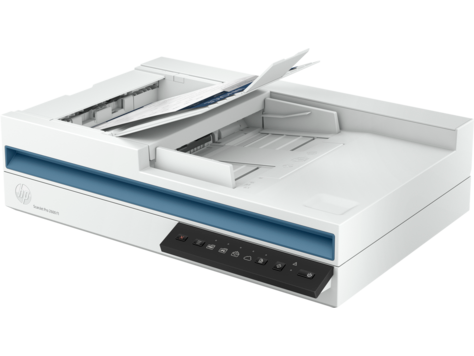
Price: UGX 1,370,000
|||Scan Speed: Up to 25 ppm / 50 ipm (300 dpi, color)|||Automatic Document Feeder (ADF): 50 sheets|||Duplex Scanning: Single-pass, two-sided|||Optical Resolution: Up to 600 dpi (ADF), 1200 dpi (flatbed)|||Daily Duty Cycle: Up to 1,500 pages|||Connectivity: USB 3.0|||Flatbed Size: 216 x 297 mm (A4)|||Included Software: HP Scan, HP Scanner Tools Utility|||
In today's fast-paced digital world, efficient document management is no longer a luxury but a fundamental necessity for businesses and home offices alike. The HP ScanJet Pro 2600 f1 Document Scanner emerges as a powerful solution, meticulously designed to streamline your paper-to-digital conversion process. This robust device is engineered to handle a diverse range of scanning tasks with unparalleled speed, precision, and ease, empowering users to reclaim valuable time and focus on core activities. It’s more than just a scanner; it’s a productivity hub that seamlessly integrates into your existing workflow, ensuring that critical information is captured, organized, and accessible whenever and wherever you need it.
Unmatched Speed and Efficiency for Demanding Workloads
Time is a precious commodity, and the HP ScanJet Pro 2600 f1 is built to save it. Boasting impressive scanning speeds of up to 25 pages per minute (ppm) and 50 images per minute (ipm) when scanning at 300 dpi in full color, this scanner ensures that even large batches of documents are processed swiftly. The secret to this efficiency lies in its advanced single-pass duplex scanning capability. Unlike conventional scanners that require you to flip each page manually to scan both sides, the ScanJet Pro 2600 f1 captures both the front and back of a document in a single pass. This feature alone can drastically cut down scanning time, making it an invaluable asset for anyone dealing with multi-page, double-sided documents such as invoices, contracts, or reports. The integrated 50-sheet Automatic Document Feeder (ADF) further enhances productivity, allowing you to load a stack of documents and walk away, confident that the scanner will handle the rest with minimal intervention. This blend of speed and automation ensures that your document archiving and digitization projects move forward without unnecessary delays, making it an ideal companion for busy professionals and small teams alike.
Superior Image Quality for Perfect Digital Reproductions
When digitizing documents, the clarity and fidelity of the scanned image are paramount. The HP ScanJet Pro 2600 f1 excels in this regard, delivering exceptional image quality that preserves every detail of your original documents. With an optical resolution of up to 600 dpi through the ADF and an impressive 1200 dpi on the flatbed, you can expect crisp text, vibrant colors, and accurate reproductions of even the most intricate graphics. This high resolution is particularly beneficial for scanning historical documents, photographs, or detailed schematics where every nuance matters. Beyond raw resolution, HP's advanced imaging features work tirelessly behind the scenes to optimize every scan. Automatic deskewing corrects crooked pages, ensuring perfectly aligned digital files. Auto-cropping intelligently detects document edges, removing unwanted borders and producing clean, professional-looking scans. Blank page removal automatically skips empty pages, reducing file sizes and clutter. These intelligent enhancements not only save you time during post-processing but also guarantee that your digital archives are of the highest possible standard, ready for any future use or analysis. For those who require precise color reproduction or detailed graphical representations, the scanner's capabilities ensure your digital copies are true to the original.
Versatile Document Handling: From Delicate Originals to Robust Cards
The modern office environment deals with a wide array of document types, and the HP ScanJet Pro 2600 f1 is designed to handle them all with remarkable versatility. Its combination of an ADF and a flatbed scanner provides unmatched flexibility. The 50-sheet ADF is perfect for processing standard paper documents, from A4 sheets to legal-sized papers, making quick work of bulk scanning tasks. However, not all documents are suitable for an ADF. Delicate originals, bound materials like books or magazines, fragile photographs, or oddly sized items would be damaged or improperly scanned by an ADF. This is where the integrated flatbed comes into its own. It allows you to safely scan sensitive or non-standard items without fear of damage, ensuring that even your most treasured or unique documents can be digitized with care. Furthermore, the ScanJet Pro 2600 f1 is adept at handling various media thicknesses, including embossed plastic cards such as IDs, credit cards, or membership cards. This capability makes it an indispensable tool for businesses that need to capture customer identification or process various forms of plastic media, ensuring that all aspects of your record-keeping are covered by a single, reliable device. Explore our extensive range of printers to complement your scanning setup and achieve a complete office solution.
Seamless Integration and Intuitive Software Experience
A powerful scanner is only as good as the software that drives it, and the HP ScanJet Pro 2600 f1 comes equipped with a suite of tools designed for maximum usability and integration. The included HP Scan software provides an intuitive interface for managing your scanning tasks, offering customizable profiles for different document types and destinations. Whether you need to scan to PDF, JPEG, TIFF, or other popular formats, the software makes it easy to choose your preferred output. It also supports scanning directly to email, network folders, or cloud services, facilitating seamless sharing and collaboration. For advanced users and IT professionals, the scanner supports industry-standard TWAIN and ISIS drivers, ensuring compatibility with a vast ecosystem of document management systems and third-party applications. This open compatibility means the ScanJet Pro 2600 f1 can be effortlessly integrated into virtually any existing office workflow, minimizing disruption and maximizing efficiency. The HP Scanner Tools Utility further empowers users with diagnostic tools and settings management, ensuring the scanner always operates at peak performance. For enhanced document organization, consider exploring our selection of document management software.
Robust Design and Reliable Performance for Everyday Demands
Designed for the rigors of daily office use, the HP ScanJet Pro 2600 f1 is built to last. Its robust construction ensures durability and consistent performance, even under heavy workloads. With a daily duty cycle of up to 1,500 pages, this scanner is perfectly suited for small to medium-sized businesses and busy home offices that require a reliable solution for their ongoing digitization needs. HP's commitment to quality means you can depend on this scanner to perform day in and day out, minimizing downtime and maintenance concerns. The streamlined design not only looks professional but also occupies a minimal footprint on your desk, making it suitable for even compact workspaces. Its quiet operation ensures it won't disrupt your work environment, allowing you to maintain focus while documents are being processed. This balance of performance, durability, and thoughtful design makes the ScanJet Pro 2600 f1 a smart investment for any organization looking to enhance its document management capabilities and secure its digital future. To protect your investment, browse our range of office accessories, including cleaning kits and dust covers.
Enhanced Connectivity and User-Friendly Features
Connecting the HP ScanJet Pro 2600 f1 to your computer is a straightforward process, thanks to its high-speed USB 3.0 interface. This modern connectivity standard ensures rapid data transfer, allowing you to quickly move large scanned files without bottlenecks. The plug-and-play setup means you can get up and running in minutes, with minimal technical expertise required. The scanner features intuitive one-touch buttons on its control panel, allowing you to initiate common scanning tasks with a single press, further simplifying daily operations. Whether you need to scan to PDF, email, or a specific folder, these programmable buttons can be customized to your most frequent workflows, dramatically reducing the steps involved in digitizing documents. This focus on user convenience and seamless integration makes the ScanJet Pro 2600 f1 an accessible tool for all levels of users, from tech-savvy professionals to those new to digital document management. Its energy-efficient design also helps reduce power consumption, aligning with modern environmental standards and contributing to lower operating costs over time. This makes it not just a powerful tool but also a responsible choice for your business or home office.
Advanced OCR and Document Management Capabilities
Beyond simply creating digital images, the HP ScanJet Pro 2600 f1 empowers you to transform those images into truly searchable and editable content through its powerful Optical Character Recognition (OCR) capabilities. With OCR, scanned documents are no longer just static pictures; they become dynamic files where text can be selected, copied, pasted, and searched. This is invaluable for research, data extraction, and making your digital archives fully actionable. Imagine quickly finding a specific phrase or number within hundreds of scanned invoices or contracts – OCR makes this a reality, dramatically improving your ability to retrieve and utilize information. The scanner supports output to various searchable formats, including searchable PDF, RTF, and TXT, ensuring compatibility with a wide range of applications and operating systems. This feature is a game-changer for legal firms, accounting departments, educational institutions, and anyone who needs to make their digitized paper documents fully editable and searchable. The ability to convert documents into these versatile formats ensures that your digital assets are not only preserved but also actively contribute to your ongoing operational efficiency and knowledge management. For more specialized needs, explore our specialty scanners that cater to unique document types.
Security and Data Protection in the Digital Age
In an era where data security is paramount, the HP ScanJet Pro 2600 f1 is designed with features that help protect your sensitive information. By digitizing documents, you can reduce the physical footprint of paper, minimizing the risk of unauthorized access to physical files. Once documents are scanned, they can be stored in secure digital environments, protected by passwords, encryption, and access controls that are far more robust than traditional filing cabinets. The scanner itself operates as a secure bridge, ensuring that the transition from physical to digital is handled with integrity. While the scanner doesn't have built-in encryption or advanced network security features (as it's a USB-connected device), it facilitates the secure digital storage and management of your documents by integrating with secure document management systems. By reducing reliance on physical paper, you enhance your overall data protection strategy, making it harder for information to be lost, stolen, or compromised. Furthermore, digital documents are easier to back up and recover in case of disaster, providing an additional layer of business continuity and peace of mind. Investing in a reliable scanner like the ScanJet Pro 2600 f1 is a crucial step towards a more secure and resilient digital infrastructure for your business.
Environmental Responsibility and Sustainable Operations
HP is committed to sustainability, and the ScanJet Pro 2600 f1 reflects this dedication through its energy-efficient design. The scanner is ENERGY STAR® certified, meaning it meets strict energy efficiency guidelines set by the U.S. Environmental Protection Agency. This certification assures you that the device consumes less power during operation and in standby modes, leading to reduced electricity bills and a smaller carbon footprint. Its low power consumption is not just good for the environment but also for your operating expenses, making it a cost-effective choice in the long run. By choosing an energy-efficient scanner, you contribute to global efforts to conserve energy and reduce greenhouse gas emissions. Furthermore, digitizing documents helps reduce paper consumption, a key aspect of environmental sustainability. Less paper means fewer trees cut down, less water used in paper production, and less waste sent to landfills. The HP ScanJet Pro 2600 f1 empowers you to embrace a more sustainable workflow, aligning your business practices with environmental responsibility without compromising on performance or functionality. It's a choice that benefits both your business and the planet, providing a clear path towards a greener, more efficient office environment.
SKU: SUP-HP-SCANJET-2600-F1-SCANNER
Brand: HP
Technical Specifications
| Specification | Value |
|---|---|
| Product Name | HP ScanJet Pro 2600 f1 Document Scanner |
| Model Number | 7FH67A |
Frequently Asked Questions
- What is the maximum daily scanning volume for the HP ScanJet Pro 2600 f1?
- The HP ScanJet Pro 2600 f1 is designed for a daily duty cycle of up to 1,500 pages, making it suitable for small to medium-sized businesses and busy home offices with regular scanning needs.